Your kit prices, kept in step with your part costs.
Build products from their parts, let the costs roll up, and push the price to WooCommerce. When a supplier raises a part, every kit that uses it is recalculated and flagged, so margin never leaks quietly.
See pricing Read the docsThe problem
You sell things you assemble. You priced them by hand from a spreadsheet. Then the frame went up $200, and 14 products kept selling at last year's price.
| Wheelset | $420.00 |
| Saddle | $65.00 |
| Assembly & tuning labor | $75.00 |
| Frame · Large · Blue | $2,300 → $2,500 |
| Rolled-up cost | $3,060.00 |
| Price at 40% markup, up to .99 | $4,284.99 |
One cost change, every kit updated
Change the frame's cost once. The bike that uses it, and the two-bike pack built from two of those bikes, get their cost recalculated in the same second, with the reason shown next to each price.
How it works
Enter part costs
A Unit cost on each part you buy, down to the individual variation. Or keep using WooCommerce's own Cost of Goods field.
Build the kit
Add parts, labor, packaging and freight on the product's BOM & Pricing tab. Shared parts go on the product once; each variation adds only what differs.
Set a rule, apply the price
Markup, target margin, or cost plus a fixed amount, rounded up to .99, the next $5, $10 or $25. Apply it and the regular price is set.
See it
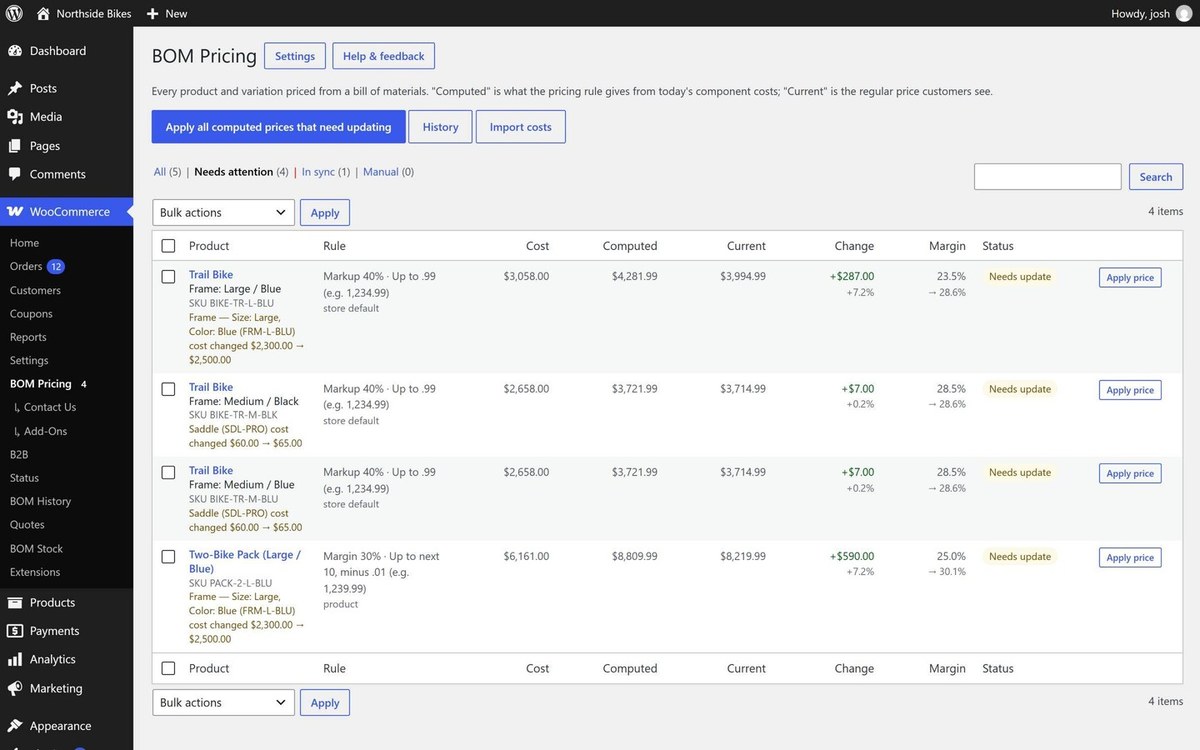
Every kit, and why it changed
One screen shows each kit's cost, the price your rule gives, the price customers see, and the margin both ways. A kit that drifted says why: "Saddle cost changed $60.00 → $65.00." Apply one price or all of them.
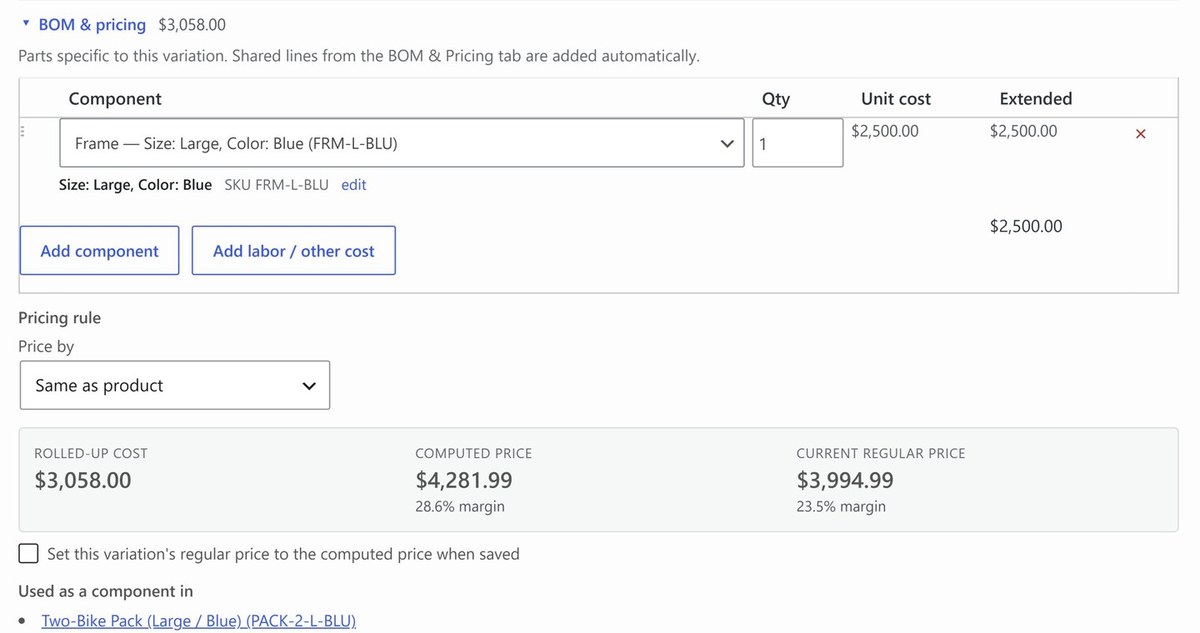
Down to the exact variation
BOM lines name the specific variation: Frame, Size: Large, Color: Blue, SKU FRM-L-BLU, not just the parent product. Cost, computed price and margin update as you type.
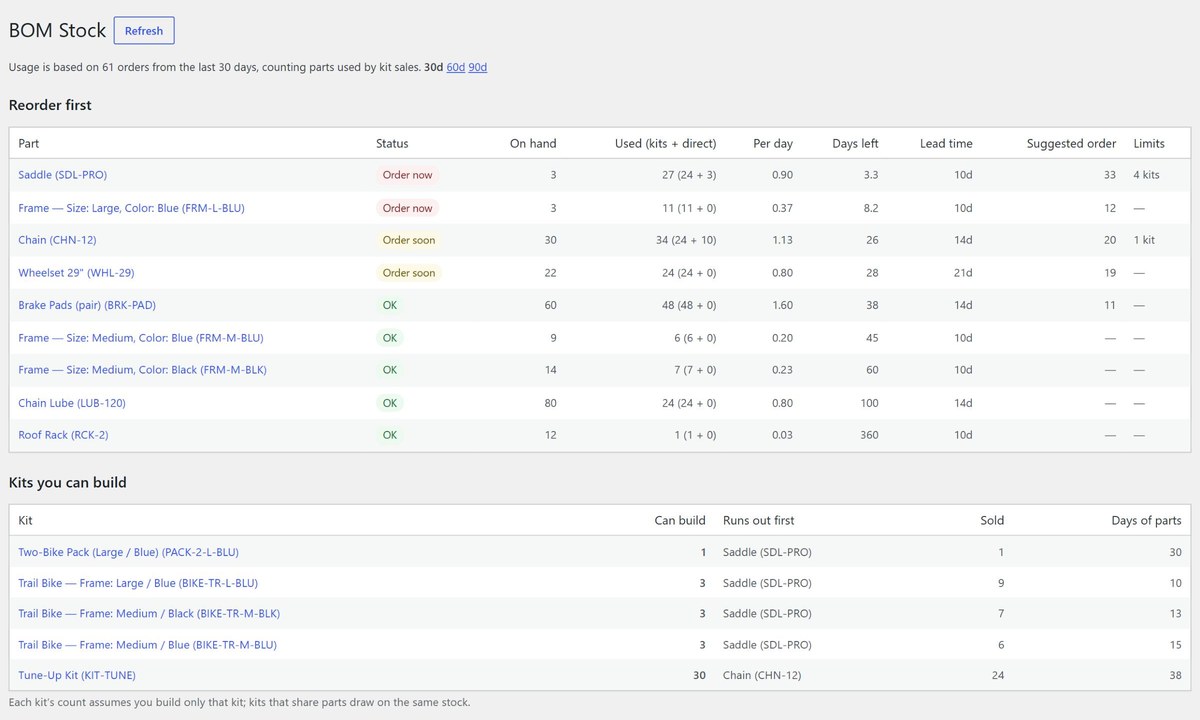
Business: know what you can build
BOM Stock counts the parts used by every kit you sell, ranks what to reorder first with lead times and suggested quantities, and shows how many more of each kit you can build before a part runs out.
Everything included
- BOMs on any product or variation. Parts are any simple product or specific variation; add labor and other costs as lines.
- Shared lines for variable products. Enter the wheels and saddle once; each variation adds its own frame.
- Kits inside kits. Costs roll up through sub-assemblies at any depth, with protection against loops.
- Pricing rules with rounding. Store default, per product, per variation. Rounding only ever goes up.
- Cost changes cascade. From the editor, an import, the REST API or WP-CLI, every affected kit is recalculated.
- Sale prices untouched. Only the regular price is set, and you're warned when a sale drops below cost.
- Works with WooCommerce Cost of Goods. Read part costs from it and write kit costs back for accurate reports.
- Pro: automatic updates with a safety limit. Small changes apply themselves; big jumps wait for you.
- Pro: bulk apply, full history, CSV cost import. Update a supplier's whole price list in one upload.
- Business: know what you can build. "14 more before the frames run out", part usage from kit sales, and which part to reorder first.
- No outside calls. Your data stays on your site. Built and supported by a small US company.
Pricing
Free
- BOMs on products and variations
- Cost roll-up through sub-assemblies
- Pricing rules with rounding
- Review screen, apply one at a time
- Cost changes flagged everywhere
Version 0.2.1 · install guide
Download freePro
- Everything in Free
- Automatic price updates with a safety limit
- Bulk apply
- Full cost and price history
- CSV cost import by SKU
Business
- Everything in Pro
- BOM-aware stock: how many more of each kit you can build, and which part runs out first
- Part usage that counts kit sales
- Reorder list with lead times and suggested quantities
- Part stock reduced automatically when a kit sells
Pro and Business are yearly licenses for 1, 5 or 25 sites; staging and development copies of a licensed site don't count. Prices in USD; sales tax or VAT is added at checkout where it applies. 14-day refund, no questions asked. See license & refund terms.
FAQ
What does Business add over Pro?
BOM-aware stock. Turn on "Manage stock" for the parts you buy and BOM Stock shows how many more of each kit you can build and which part limits it, how fast each part is being used (parts inside kits you sold count, not just parts sold on their own), and a reorder list ranked by what runs out first, using each part's supplier lead time. It can also reduce part stock automatically when a kit sells and put it back if the order is cancelled.
Do my parts have to be products customers can buy?
No. Keep them private or hidden. Search in the BOM editor includes products of every status.
Will it change my sale prices?
No. BOM Pricing only sets the regular price. It warns you if a running sale falls below cost.
Can my ERP or ops system update part costs?
Yes. Write the cost through the WooCommerce REST API or WP-CLI and every affected kit is recalculated, the same as editing the part by hand.
What happens with a big supplier increase if I use automatic updates?
Changes larger than your limit (15% by default) are held for review instead of going live, and the history records why. You can also allow only price increases to apply automatically.
What does it need?
WordPress 6.5 or newer, WooCommerce 8.0 or newer, and PHP 7.4 or newer. Tested with WordPress 7.1 and WooCommerce 11.1.
Does it send my data anywhere?
No. Nothing leaves your site unless you send us a message from the plugin's Help & feedback page. See the privacy notice.