One store. Retail and trade prices. No second site.
Wholesale customers log in and see their prices on product pages, in the cart, at checkout and in emails. Everyone else sees your normal prices. Pro prices from cost with a margin floor; Business adds quotes with margins and net terms.
See pricing Read the docsThe problem
Your dealers email for a price list. You keep it in a spreadsheet. A part cost goes up, the retail price moves, and three dealers are still buying at last quarter's number, under your margin floor.
| Wheelset kit · cost | $182.40 |
| Retail price | $299.99 |
| Dealer rule · cost + 25% | $228.00 |
| Distributor rule · 30% off retail | $209.99 |
| Margin floor · 20% over cost | $218.88 min |
| Distributor pays | $209.99 → $218.88 |
Prices that know what things cost
Set wholesale rules per role, category, product or variation. Cost-based rules read the cost from BOM Pricing, WooCommerce cost of goods or a cost field, and the margin floor raises any price that would sell under it. The product's B2B tab shows the price each role pays now and the margin on it.
How it works
Give customers a role
Wholesale is built in. Pro adds any roles you like: Dealer, Distributor, Installer. Approve them by hand, or let them apply through a form on your site.
Set the rules
A fixed price, % off retail, cost + markup % or cost + a fixed amount. Most specific wins: variation → product → category → role → store default. Then quantity breaks, then the margin floor.
Sell
Trade customers see their price everywhere, including the block cart and checkout, the mini-cart and the Store API. Prices are calculated on the server, so every screen shows the same number.
See it
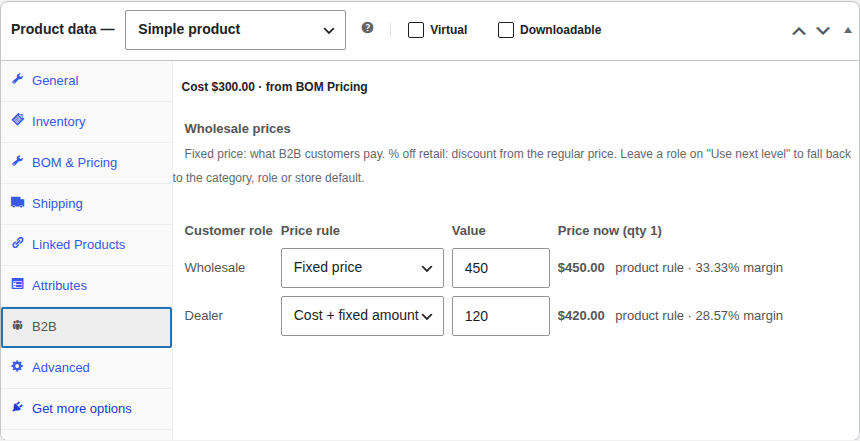
Every role's price, on the product
The B2B tab lists each role, its rule, the price it pays right now and the margin over cost. The cost line says where the cost came from: "Cost $182.40 · from BOM Pricing."
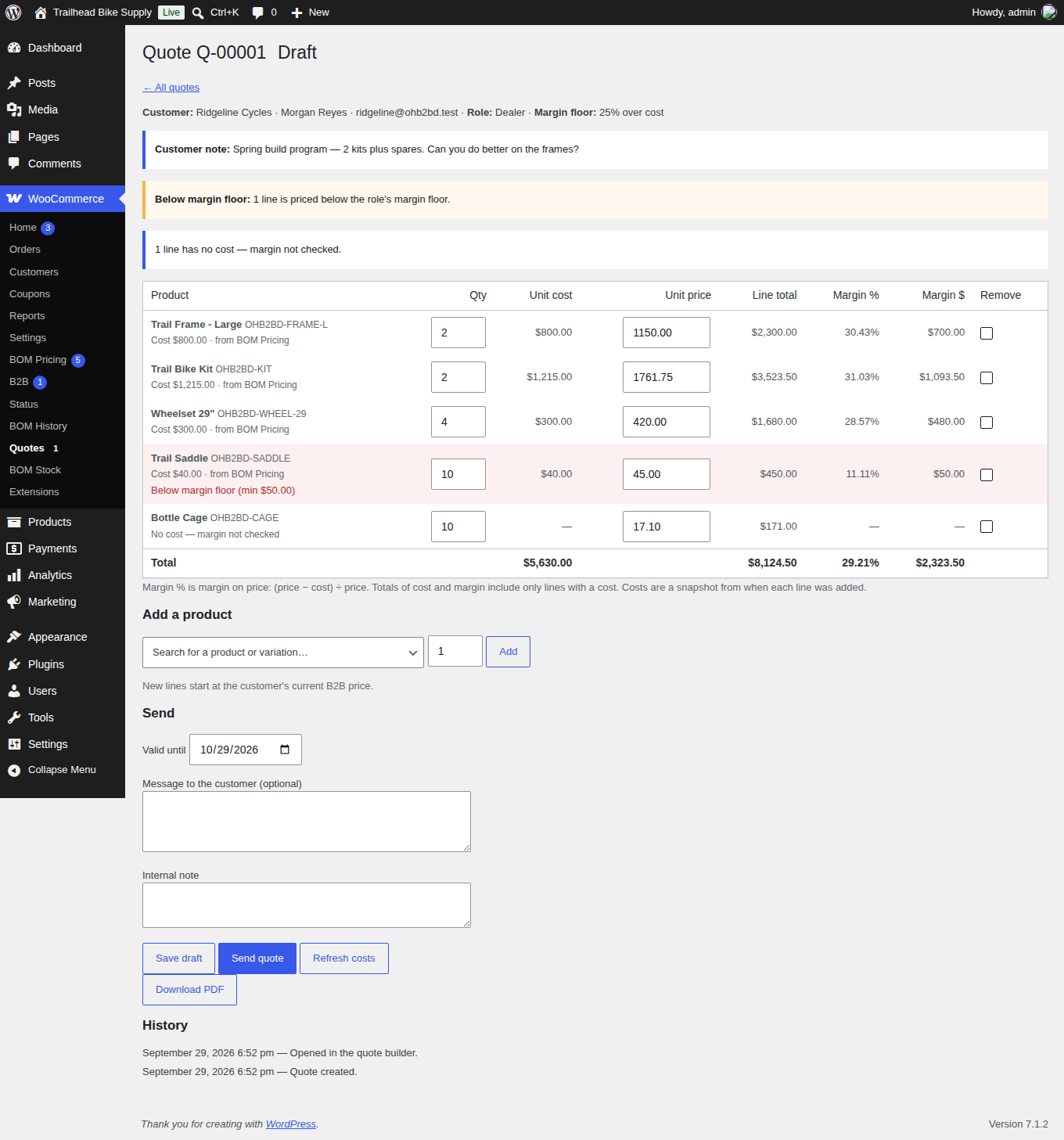
Quotes you can see the margin on
Business adds a quote builder with cost, price, margin % and margin $ on every line and in total, and a warning on any line under the role's floor. Send it with a PDF; the customer accepts online and an order is created at the quoted prices.
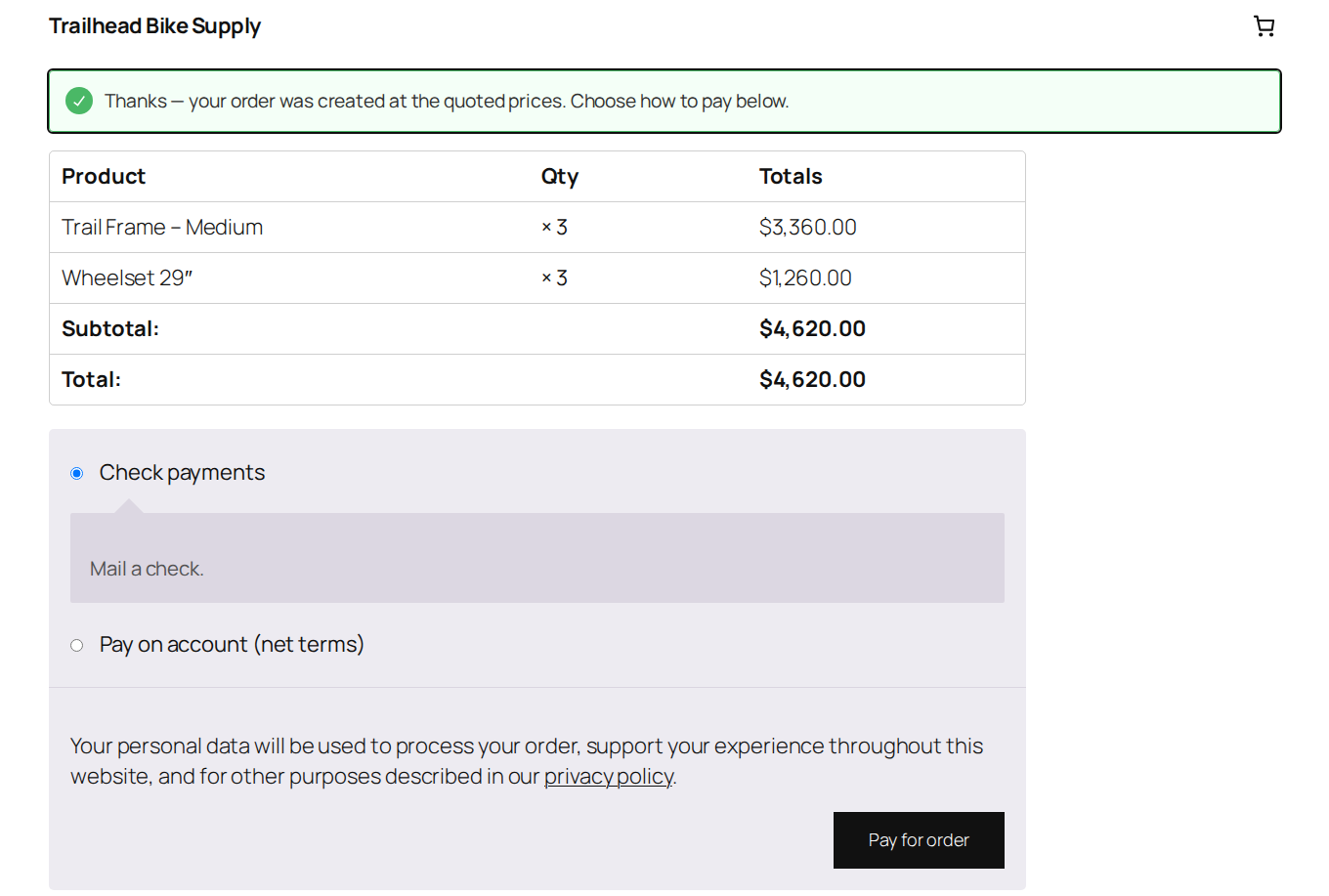
Net terms, with a limit
Give a customer Net 15, 30 or 60 and an allowance. Only they see the payment method. Orders go on hold with a due date, and marking the invoice paid frees their allowance.
Features
- Wholesale price per product or variation. Fixed, or % off the regular price. Variations inherit the product's rule unless they have their own.
- Hide prices from guests. "Log in to see prices" on the storefront, in the Store API and in product structured data.
- Wholesale minimum order. Trade customers can't check out under it; retail customers never see it.
- Never above retail. If a product is on sale for less than the wholesale price, the trade customer gets the sale price.
- Unlimited roles (Pro). Each with a default rule, margin floor, quantity breaks and its own minimum order.
- Cost-based pricing (Pro). Cost + markup % or cost + fixed, set at store, role, category, product or variation level.
- Dealer applications (Pro). A shortcode form, approve or reject with an email, new applicants get a password link.
- Tax-exempt customers (Pro). Tick the flag, store the tax ID; it's saved on every order.
- Quotes (Business). Request from a product page or the cart, build with margins, send with a PDF, accept online, expire on a date.
- Net terms (Business). Net 15/30/60 with a per-customer allowance; classic and block checkout.
- Works with BOM Pricing. Cost-based prices use rolled-up kit costs and follow component changes. Sent quotes keep their cost.
- HPOS, blocks, WP-CLI. Custom tables, block cart and checkout,
wp ohb2b price / cost / set-rule / quote. - Clean uninstall. Your data stays unless you say otherwise. Orders are never changed.
- GPL, no tracking. Free core on WordPress.org. The plugin makes no outside connections on its own.
Pricing
Free
- Wholesale role with fixed or % off prices
- Per product and per variation
- Hide prices from guests
- Wholesale minimum order
- Works with BOM Pricing costs
- WP-CLI
Pro
- Everything in Free
- Unlimited B2B roles
- Cost + markup and cost + fixed rules
- Margin floor per role
- Quantity breaks
- Dealer application form
- Tax-exempt customers
- Email support, updates for a year
Business
- Everything in Pro
- Quotes with cost, price and margin per line
- PDF quotes, online accept, expiry
- Request-a-quote on products and cart
- Net terms payment method with allowance
- Quote export and WP-CLI
Yearly, in US dollars, renews automatically until cancelled. 14-day refund on any payment, no questions. Staging copies of a licensed site don't count. Payments are processed by Freemius. License & refund terms.
FAQ
Do retail customers ever see wholesale prices?
No. Only logged-in customers with a B2B role get B2B prices. Guests and retail customers pay your normal prices, and you can hide prices from guests entirely.
Does it need BOM Pricing?
No. B2B works on its own with WooCommerce's cost of goods or its own cost field. With BOM Pricing active, cost-based prices use rolled-up kit costs and follow component changes automatically. Deactivate BOM Pricing and B2B falls back without errors.
Does it work with the block cart and checkout, and HPOS?
Yes. Prices show in the classic and block cart and checkout, the mini-cart, the Store API and order emails. Quotes live in their own tables, so they work with and without HPOS. Our test suite runs every test with HPOS off and on, with and without BOM Pricing.
Can a wholesale customer pay more than a retail sale price?
No. The B2B price is capped at whatever a retail customer would pay right now, including sale prices. Then the margin floor applies.
What happens to a sent quote when a cost changes?
Nothing. Each quote line keeps the cost, source and price from when it was added, so a later component change never alters a quote you've already sent.
What if I stop paying?
Pro and Business keep working on your site. You stop getting updates and support until you renew.
What does uninstalling remove?
Nothing, unless you tick "Remove data on delete". Then settings, wholesale prices, B2B costs, customer B2B details and quotes are removed, B2B customers become regular customers, and orders are left exactly as they were.